
Apps overview
Dynamic HTML pages an agent publishes, at a stable URL, with data that stays live.
Some output isn't a message. A pipeline dashboard, a sales activity report, a competitive deck for a customer meeting — those want to be a page you return to, not a Slack post you scroll past.
Apps is where those live.
Live apps
A live app is a dynamic HTML page published by an agent, at a stable path like /apps/pipeline-dashboard-v2.
Later runs update the same page rather than producing a new artifact, so a link you send in week one still shows
current data in week six.
The Apps index shows each app with its path, when it was last updated, and its size. Real examples from a working workspace:
/apps/taizen-sales-activity-report— a recurring activity report/apps/pipeline-dashboard-v2— a dashboard an agent refreshes/apps/skyclaim-competitive-intel— a competitive landscape built for one account/apps/ai-roleplay-demo-clip— a shareable clip
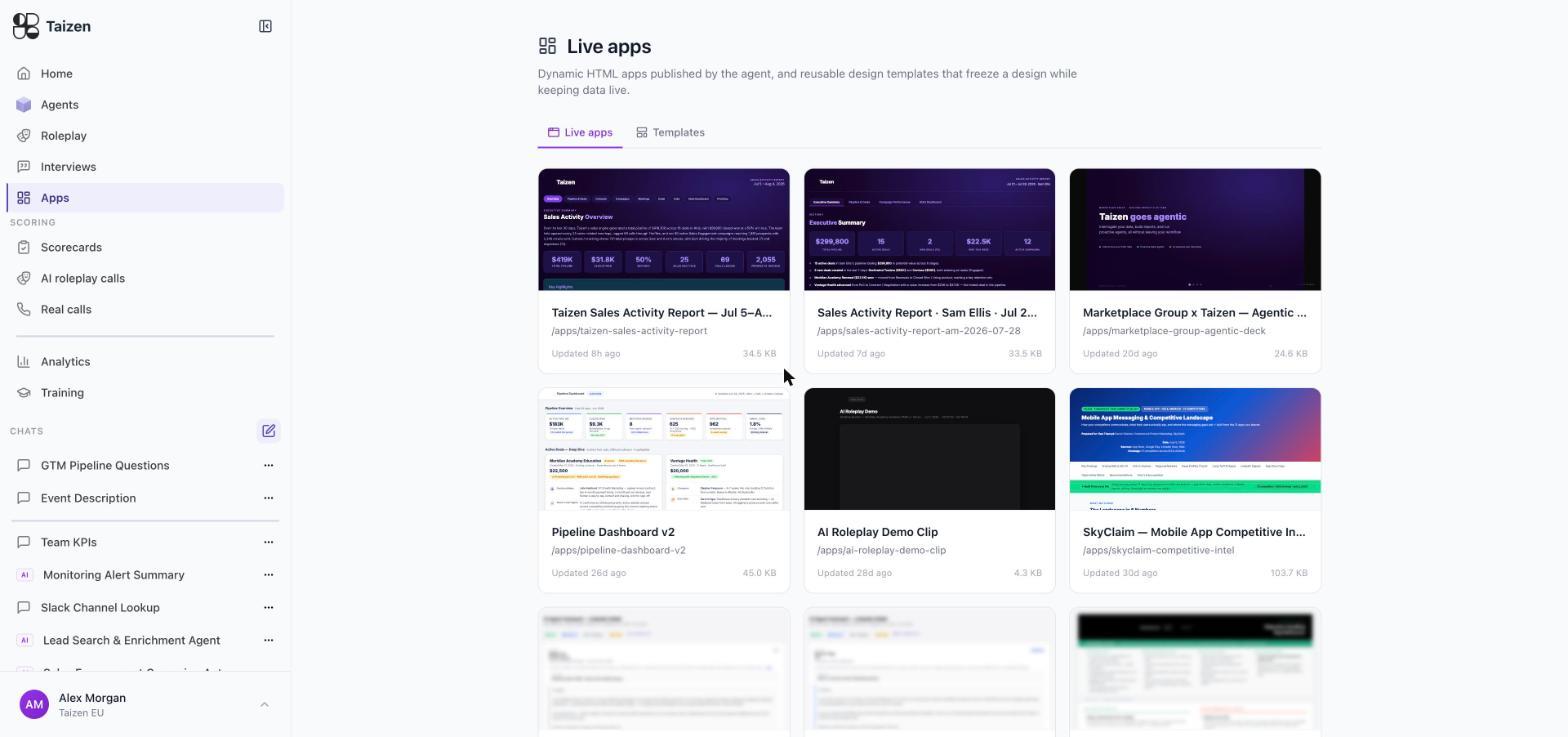
Each card renders a live preview of the page itself, so the index reads like a shelf of finished artifacts rather than a list of filenames — a dashboard with its metric tiles, a deck with its title slide, a battlecard with its objection grid. Under the preview: the app's name, its path, when it was last updated, and its size.
Templates
The Templates tab holds reusable designs that freeze a design while keeping the data live. That separation is the useful bit: you settle the layout once, and subsequent runs pour new data into it instead of re-inventing the presentation every time.
Use a template when:
- the same report goes out weekly and should look identical each time
- a customer-facing page needs to match your brand
- several regions want the same dashboard with their own numbers
When to use an app instead of a message
| Output | Best form |
|---|---|
| "Here's what you need before your 9am call" | Slack message (delivery) |
| "Here's the current state of the pipeline" | Live app |
| "Here's what changed about a competitor this week" | Slack message, with a live app for the full landscape |
| "Here's a report for a customer" | Live app, from a template |
| Anything a rep must act on today | Slack or email. A dashboard nobody opens changes nothing |
The rule of thumb: messages for events, apps for state.
How one gets created
Apps are published from a chat or by an agent. You describe the page you want, the agent builds it, and it's published at a path. See publish and share.
Because an agent owns the app, its refresh cadence is just the agent's trigger — a dashboard that updates every weekday morning is a scheduled agent whose delivery is a live app.
Versions
Apps keep versions, so a page that regresses can be compared against what it looked like before. Useful when an agent's instructions changed and the layout changed with it.
Duplicating
An existing app can be duplicated as the starting point for a new one — the fastest way to give a second team the same dashboard against their own data.