
Read the results
Statuses, outcomes, superseded interviews, and turning an interview into a battlecard, a drill and a coaching note.
The queues
| Tab | Meaning |
|---|---|
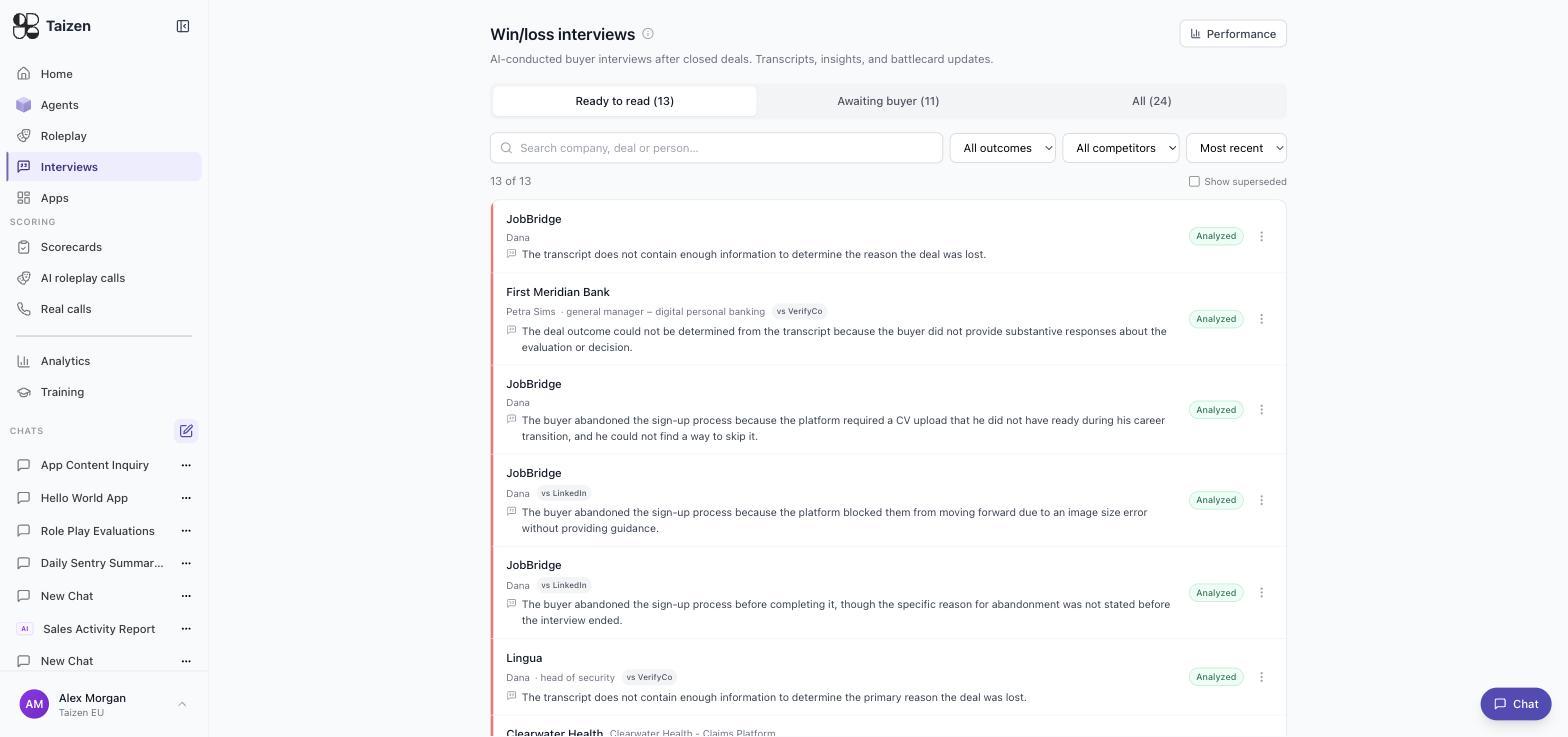
| Ready to read | Completed and analyzed. Your working queue |
| Awaiting buyer | Outreach sent, no interview yet. Nothing to do — the agent is chasing |
| All | Everything, with Show superseded to include earlier attempts that were re-run |
Filters: outcome, competitor, and sort by most recent. Search by company, deal or person.
Reading a row
Each row carries the company, the person and their role, the competitor if there was one, an Analyzed status, and a one-line conclusion. Those one-liners are honest, which means some of them say the interview didn't conclude anything:
The transcript does not contain enough information to determine the reason the deal was lost.
The deal outcome could not be determined from the transcript because the buyer did not provide substantive responses about the evaluation or decision.
That's the system declining to invent a reason. Two or three of these in a row usually means the outreach is reaching the wrong person — the champion rather than the decision maker — or that the interviews are happening too long after the decision. Fix the targeting rather than the analysis (set up a program).
And some are immediately actionable:
The buyer abandoned the sign-up process because the platform required a CV upload that he did not have ready during his career transition, and he could not find a way to skip it.
Superseded interviews
When an interview is re-triggered, the earlier one is marked superseded rather than deleted. The current answer is the one that shows by default; the history is there when you need to know what changed. Turn on Show superseded on the All tab.
What to do with one
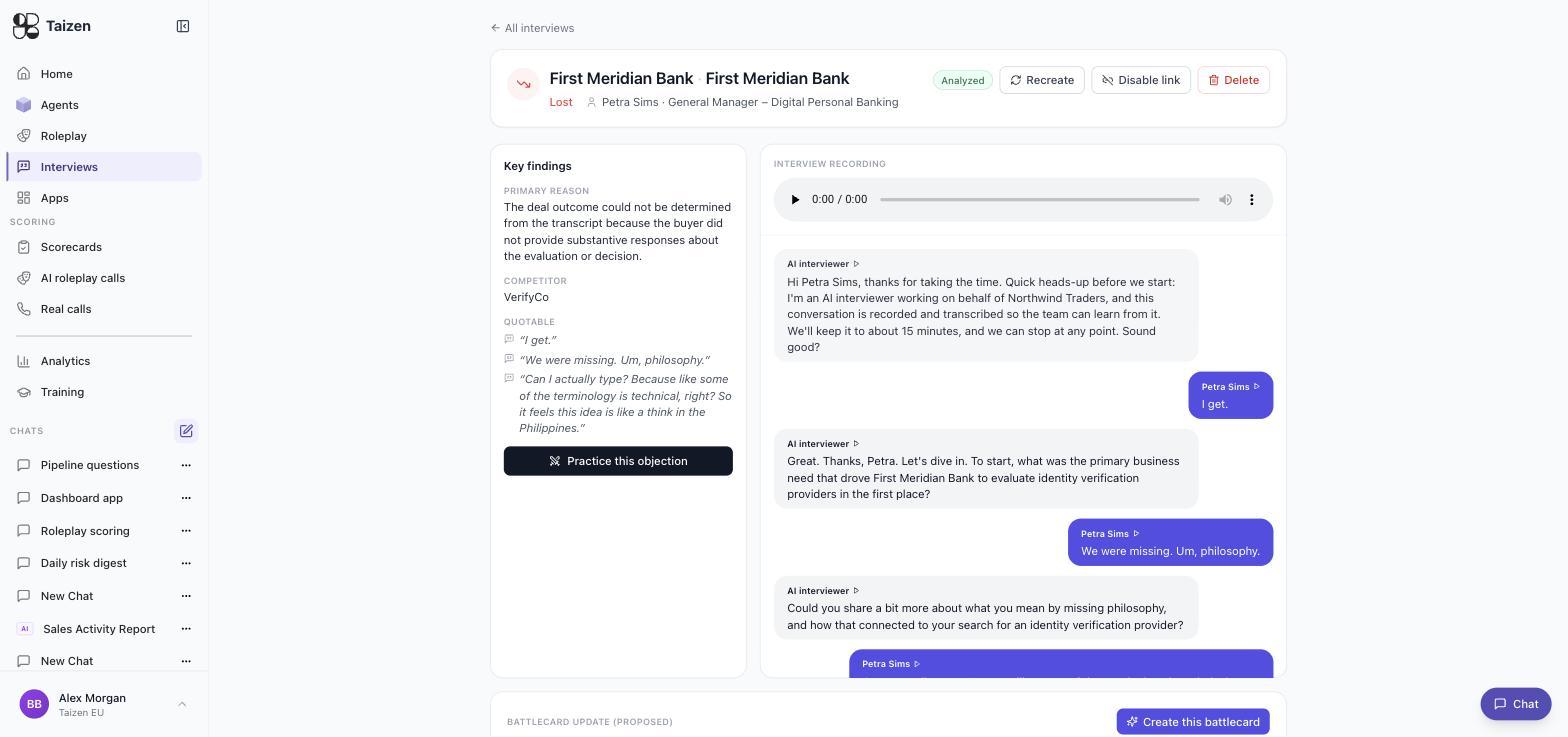
An interview page opens with Key findings — the primary reason, the competitor, and quotable lines pulled from the transcript — beside the recording and the full transcript. Below that sits a proposed battlecard update with a Create this battlecard button, and next to the findings a Practice this objection button that turns what the buyer said into a roleplay drill. The header carries Recreate, Disable link and Delete.
So the four outputs below aren't manual work you have to assemble — two of them are buttons:
- Update the battlecard. If it was competitive, the objection the buyer actually raised belongs in the objection-handling section, in their words. Have a human read it before it ships — positioning changes propagate to every rep (validation and review).
- Build the drill. Turn that buyer into a bot and the objection into a roleplay step. This is the most direct path from "we lost" to "we're better at this now".
- Coach the rep. Read the buyer's account and the rep's account together. The divergence is the coaching conversation — see interview types.
- Feed the theme. One interview is an anecdote. Look for the same reason across several before you change positioning.
Performance and analytics
Performance on the Interviews screen, and Analytics → Win/Loss, aggregate across interviews: outcomes, competitors, and recurring reasons.
Read them for themes, not counts. "Four buyers in six weeks said our integration story was thinner than the incumbent's" is a mandate to change something. "Twelve losses this quarter" is a number you already had.
Where it connects
- A recurring loss theme and a weak dimension in training analytics are usually the same problem from two ends.
- A competitor's public change (competitive watchlist) explains what changed; the interview explains why it cost you the deal.
- Real-call scores (score real calls) show whether reps are handling the objection now — the closing of the loop.