
Agents overview
A trigger, a workflow, and a delivery destination — the whole model in one page.
An agent is a piece of work that runs without anyone asking. Three parts:
TRIGGER            WORKFLOW                    DELIVERY
schedule       →   model + instructions   →    Slack channel
or event           (plus skills, tools,        email recipients
                    integrations)              CRM write-back
                                               Live App
That's the whole model. Everything else in this section is detail on one of those three boxes.
Why not just ask a chatbot
A chat assistant waits to be asked. An agent doesn't. It fires when a call ends, when a deal is marked lost, or at 7am on weekdays; it already holds your CRM records, call history and past buyer interviews as context; and it delivers the result where the work happens.
You can prompt an assistant to write a battlecard. You can't prompt it to notice a competitor moved on Tuesday, rewrite the objection section, and have four reps drilled on it by Friday.
The Agents screen
Agents in the sidebar, with six tabs:
| Tab | What's there |
|---|---|
| Agents | Every agent, grouped into Scheduled, Other active and Inactive. Filter by trigger, owner or type |
| Templates | Prebuilt agents grouped by team — Sales, Enablement, RevOps, PMM, Competitive Intelligence |
| Pending validation | Agents that arrived from a colleague or a template, waiting on a successful test run before they can fire — see validation and review |
| Timeline | Every run across the workspace, newest first, with output previews |
| Jobs | The scheduled units behind runs — where to look when a run you expected never happened |
| Analytics | Volume, success rate and cost across your agents |
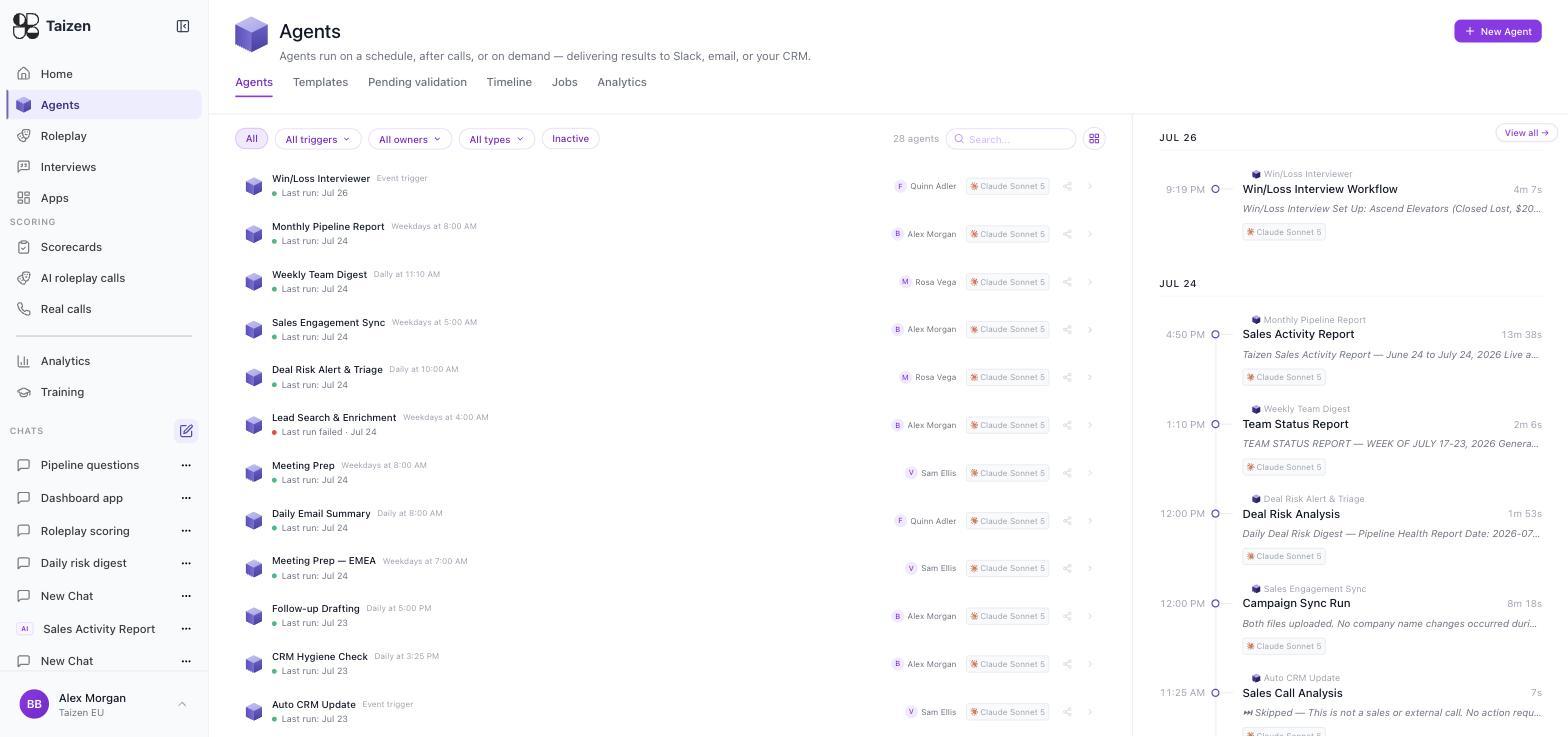
Each row shows the agent's name, its trigger ("Weekdays at 8:00 AM", "Event trigger"), the model it runs on, its owner, and when it last ran. A red dot on the last run means the last attempt failed.
Agent status
An agent is Active or Inactive. Inactive keeps everything — config, history, ownership — but the trigger won't fire. Deactivating is the right move when an agent is noisy; deleting throws away the run history you'd want in order to understand why.
What an agent can reach
- Your primitives — calls and transcripts, CRM companies/contacts/deals, documents, past interviews
- Skills — your standing instructions for recurring tasks
- Connected integrations — read and write, subject to the scopes you granted
- MCP servers you've connected
- Web research — for competitor monitoring and company research
Everything an agent reads is scoped to your workspace. See what agents can see.
Ownership
Every agent has an owner, shown on its row and filterable. The owner is who to ask when the output looks wrong, and who gets asked to review it. Give agents to the person whose job the output belongs to — Meeting Prep to the sales lead, not to whoever happened to build it.
Send on an agent's detail page hands a colleague their own copy. Theirs arrives as Pending validation and can't fire until they run it once themselves, so a shared agent never starts working in someone else's name unattended.
Where to go next
- Build an agent — the builder and the spec panel
- Triggers — schedules and event triggers
- Delivery — Slack, email, CRM, Live Apps
- Validation and review — how an agent activates, and keeping a human in the loop
- Runs and debugging — statuses, timeline, jobs
- Cookbook — five agents worth copying