
Runs and debugging
Timeline, Jobs, run statuses, and how to work out why an agent did the wrong thing.
Every run is recorded with its inputs, steps, output, duration and cost. Debugging an agent is mostly a matter of reading that record in the right order.
Timeline
Agents → Timeline is every run across the workspace, newest first, grouped by day. Each entry shows the agent that ran, the title of the output, a preview of it, the model used, and how long it took.
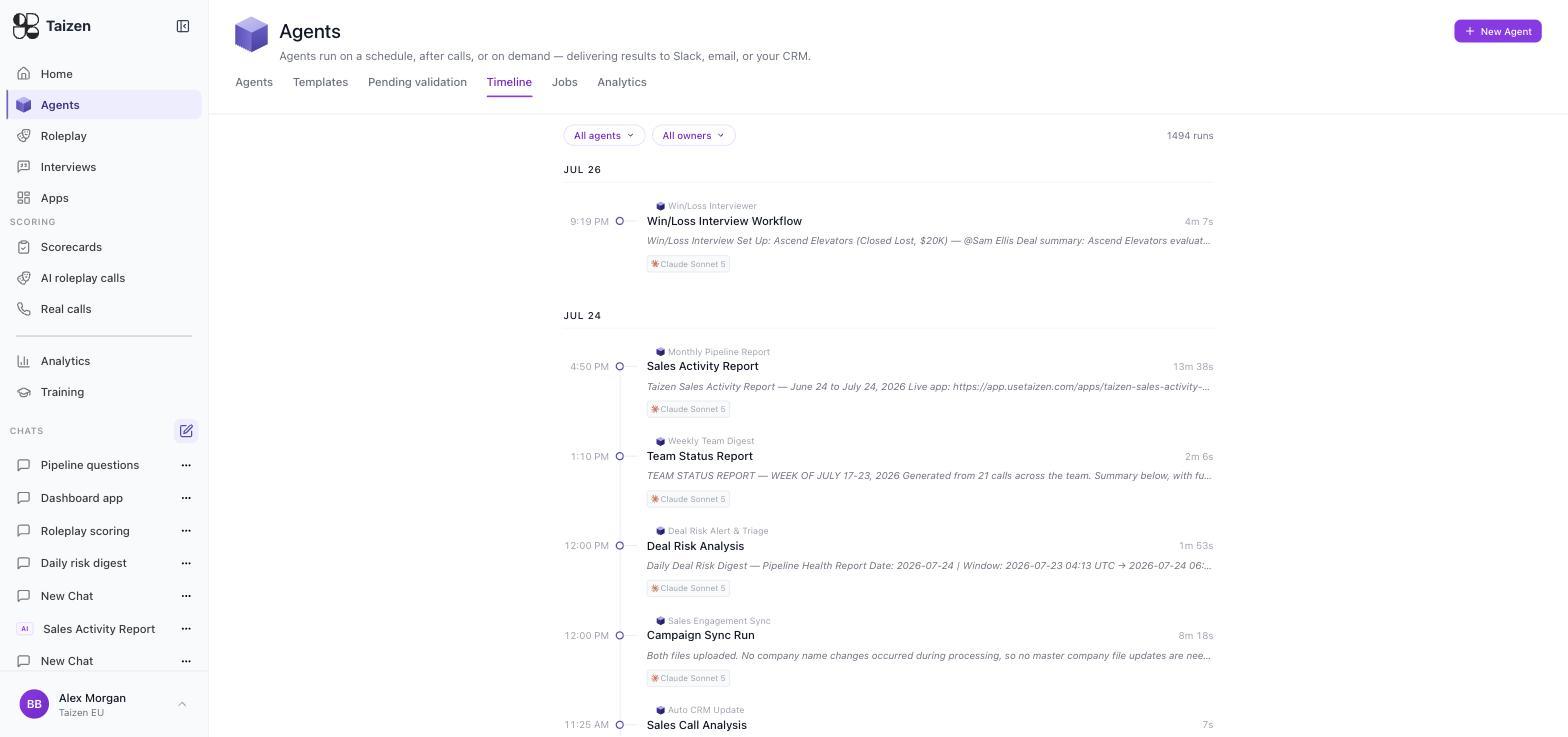
An individual agent's detail page shows the same thing filtered to that agent — which is where you look when you want to know whether behaviour changed after you edited it.
Jobs
Agents → Jobs is the job-level view of the last day: entries grouped by state — Completed, plus anything running or upcoming — each showing the agent, a Success or Skipped badge, the time it started, how long it took, and whose agent it is. Filter by owner, section or schedule, and Refresh to pull the latest.
It answers a different question from the Timeline: Timeline is about output (what did the agent produce), Jobs is about execution (did it fire, when, how long, and did it succeed). An empty Jobs list means nothing is running or due in the next 24 hours.
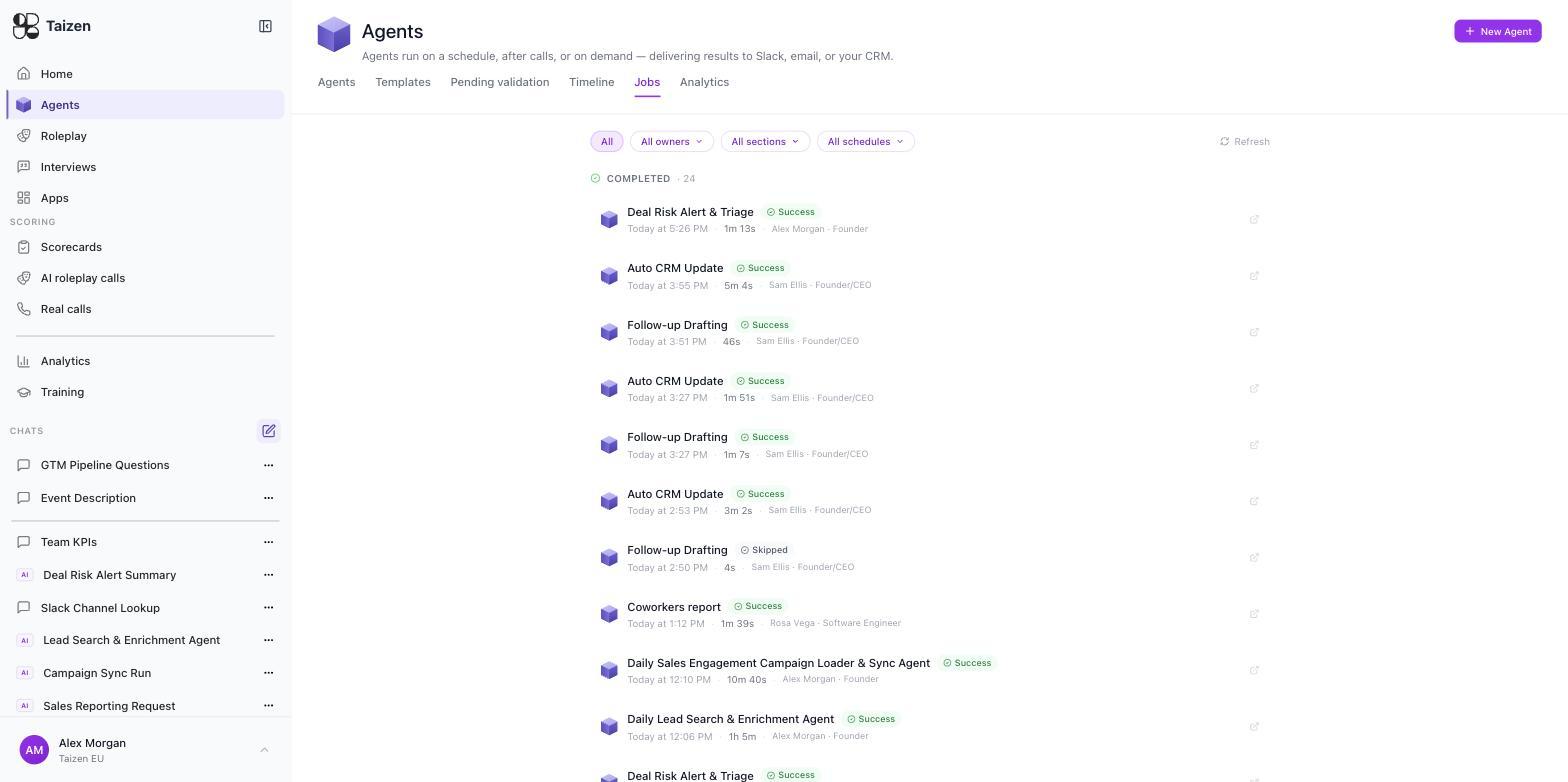
The distinction matters when debugging:
- A run exists but the output is wrong → read the run in the Timeline.
- No run exists at all → check Jobs. If the agent isn't listed as upcoming, its trigger isn't going to fire — the agent is inactive, still Pending validation, or has no trigger configured.
Run statuses
| Status | Meaning | What to do |
|---|---|---|
| Running | In flight | Wait. Long-running agents are normal; the elapsed time is shown live |
| Finishing | Work done, wrapping up delivery and evaluation | Wait |
| Succeeded | Ran and delivered | Read the output |
| Succeeded, delivery failed | The work completed but posting it failed | Fix the integration and re-run — the output is on the run, not lost |
| Skipped | The agent decided there was nothing to do | Usually correct. Read the reason before "fixing" it |
| Failed | The run errored | Read the error, then the inputs |
Skipped is a feature. An agent that runs after every call and finds an internal sync should skip it — "This is not a sales or external call. No action required" is the agent working properly. A wall of skips on runs you expected to do work means your filter is too tight.
Cost and duration
Every run shows its duration and its cost. Two habits worth forming:
- Check cost when you change the model. A frontier model on a high-volume event trigger is the main way credit consumption surprises people.
- Check duration against the trigger. An agent that takes eight minutes and fires hourly is fine; one that takes eight minutes and is meant to deliver a 7am brief needs to start earlier.
Organization-wide consumption is under Settings → Usage.
Debugging in order
- Did it run? Jobs, then Timeline.
- What did it see? The run's inputs. Most "the agent is wrong" turns out to be "the agent got different data than you assumed" — an unsynced integration, a filter that excluded the calls you cared about, a CRM field that's empty in practice.
- What did it do? The steps. This is where you see it choosing a tool, reading a record, deciding to skip.
- What did it produce? The output and any files.
- Where did it go? Delivery. A succeeded-but-delivery-failed run looks like an agent problem in Slack and isn't.
Only after those five should you edit the instructions.
Common causes
| Symptom | Usual cause |
|---|---|
| No runs at all | Agent is Inactive, or the trigger was never configured |
| Runs but nothing in Slack | Delivery not set ("Framework default"), or delivery failed |
| Output is generic | The agent isn't reaching your data — check the integration synced, and that the prompt names the sources |
| Output includes things it shouldn't | Missing exclusions in the instructions or the skill's "When to Use" |
| Everything is skipped | Filter too narrow; read one skip reason and widen it |
| Costs jumped | Model changed, or an event trigger is firing more often than expected |
| Worked yesterday, fails today | Expired or revoked key — check Settings → Integrations for a reconnect prompt |
Re-running
Re-run from the agent's detail page after a fix. A re-run is a real run: it delivers and it costs credits. If you only want to check the shape of the output, use a test run in the builder instead — those don't deliver.